Indie Journal: Week 7
For this week, I worked on adding telegraphs to their attacks (through the changing of their colours), and building the rest of the Behavior Tree. Over time I added various tasks, services and decorators that I could use and reuse across different AI types. To allow the use of different types without having to recreate everything, I added the 'EnemyType' int to the BaseEnemy and used that int to determine what behavior tree to run in the AIController.
I then spent the rest of the 7th week developing various other things, like the second enemy type 'Charger' and various visual effects for them. I also went about creating a new sword and then animating it with Maya for the attacks and spawning of the sword upgrade.
Animation in Maya was new to me, but was not a new concept - I had done animation within Max and found the skills transferred quite easily. Since the object I was modelling was not making use of a skeleton, I used simple keyframe animations for position and scale to achieve my desired effect. I created an idle animation, AttackLeft, AttackRight and 3 parts for the 'Charge Attack' animation that would also be used for the third attack in the combo.

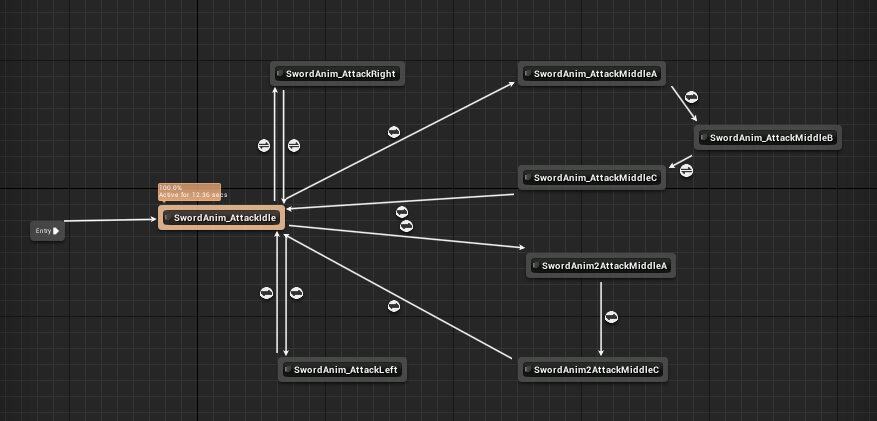
Upon importing them, I went and created an Animation Blueprint within UE4 to use them in my player. I did this by having various bools that turn on when the player attacks with a certain type, and used that to fuel my State Machine with the Animation Blueprint. I have had experience using the Animation Blueprint within UE4 before, and knew how to get them working (although I do not remember which project I first attempted that on).
I then spent the rest of the 7th week developing various other things, like the second enemy type 'Charger' and various visual effects for them. I also went about creating a new sword and then animating it with Maya for the attacks and spawning of the sword upgrade.
Animation in Maya was new to me, but was not a new concept - I had done animation within Max and found the skills transferred quite easily. Since the object I was modelling was not making use of a skeleton, I used simple keyframe animations for position and scale to achieve my desired effect. I created an idle animation, AttackLeft, AttackRight and 3 parts for the 'Charge Attack' animation that would also be used for the third attack in the combo.

Upon importing them, I went and created an Animation Blueprint within UE4 to use them in my player. I did this by having various bools that turn on when the player attacks with a certain type, and used that to fuel my State Machine with the Animation Blueprint. I have had experience using the Animation Blueprint within UE4 before, and knew how to get them working (although I do not remember which project I first attempted that on).
Then, came the bug. Again, but in a different form.
I found through play-testing that the charge attack was unreliable. I wanted the player to pull the enemy into the charge attack so they wouldn't 'slip out' during it. I achieved this by having a scene component within the collision of the charge attack, and had it launch any enemies affected by the attack towards it. To help visualise things, I created a debug sphere to display on top of the scene component. However, the debug sphere always drew above the player. This was exactly like before, with the camera during Soul Capping.
I spent the rest of Week 7 trying to fix this issue. Throughout my experimentation, I could never figure out why it wasn't affected by the player's rotation. However, when I did the charge attack, the sphere rendered in the correct position. This was relieving! However, it was still rather satisfying. While I am now able to achieve the desired effect, I still do not know what the cause of the issue is. The method used to rotate the player during the charge attack is the exact same as the rotation used for facing the mouse. Perhaps one day I will figure out something.
However, you might realise something. it is currently Week 7, moving into Week 8.

Comments
Post a Comment