Indie Journal: Week 6
Throughout this week, I wanted to get working enemies. For the type of enemy I wanted to create, I had to develop AI. This was something I only lightly touched on before, so this was a big dive for me.
AI is the most frustrating thing I've had to develop for this project.
To help with the development of AI, I made use of several tutorials - I wanted to make use of the AI systems within UE4 - Blackboards, AI Controllers, Behavior trees and the like. This was something used within games - the AI created with in classes were done through pure blueprint. Making use of the Behavior tree allows complicated AI systems and the ability to create additional trees easily. Since I had multiple enemies to make, this system sounds perfect. The issue that I came across, was making the AI feel right.
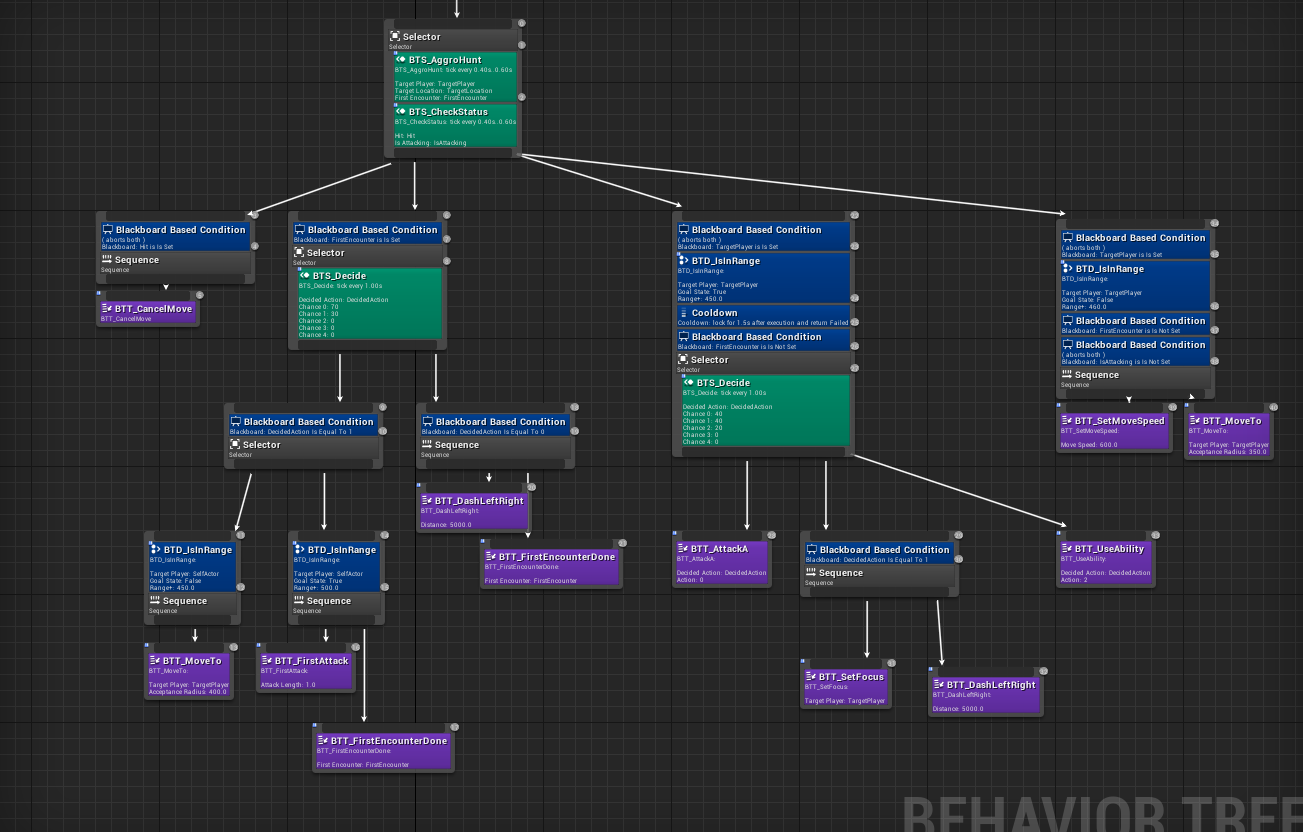
The first thing I did for the AI system is develop an enemy - this enemy would be the 'template' for every other enemy. Within that 'Base Enemy', I created the basics like the health, knockback, death and various things that would be universal across all enemies. I would then create children of the base enemy and add in the various unique attacks that I wanted the enemy to have, each one being called under the same custom event like 'AttackA' and 'FirstAttack'. This way, I could use the same AI Task across multiple enemies and each attack used by that task would be different.
The first enemy I created was the 'Grunt', which is the graph you see above. Effectively, the grunts are small agile creatures that attack from short range and charge the player when they first spot them. Since I had only made 2 abilities (knockback and blink slash), I attached the blink slash for now.
The most frustrating part of the AI was the random chance service I wanted to use to vary up the enemy's attacks. I wanted to take an array of 'chances' that add up to 100 and input it into a system that would pick one randomly and return it as an index of said array. While this may sound simple in concept, it was difficult to find any working examples online and then even more difficult to make the changes I wanted to make.

Effectively, what this function does is take in an array and pick a random int between 0 and 100. For each element in the array, it would add that to a 'total sum' and then check if the total sum is bigger than the random int. If this was the case, it would return the value, if not, it would try again.
While this system is rather simple, figuring it out was quite annoying. At first, I didn't understand how it worked at all. However, after I got this working (which took a while, as there was a lot of problems, such as always returning 0), I was able to use it to make the enemy randomly pick between attacking or dodging.
Comments
Post a Comment