Indie Journal: Week 3
For this week, I created some basic dummies to attack, the knockback system for said dummies, and the basics for a new mechanic I created for my game.
Once I had a working basic attack and charge attack, I went on to create enemies to attack. I setup a simple dummy character that had a basic health system and then realised that upon attacking them, there was no feedback of any kind. The enemy just stood there and took it. This, obviously, didn't feel right.
One option for this would be to create an animated character and give them an animation in response to being attacked, but due to the time scale of this project, I knew that this would take far too long. Instead, I created a simple knockback system. The idea of this system is that when the enemy is attacked, it gets the direction of the attacker and pushes itself away from said attacker - effectively making the attacker look like they were knocked back.
This simple system proved to be very effective - having a response to the player's attack gave immediate feedback to the player. However, what needed to be decided is how far the enemy should be knocked back. I wanted bigger, heavier enemies to be knocked back less. This is where I implemented a way to 'scale' any form of physics movement from any source: Through the use of 'Linear Damping'.
However, using this method comes with it's own problems. For example, falling down will be extremely slow unless I returned Linear damping to normal (which I set to happen when 'IsFalling' is true). However, for my purposes, I felt that this would work.
Looking on at this near the end of the project, I would likely implement this in a different way. For example, scaling the launch of the knockback by a variable or using some other method to change the input force, not the output reaction.
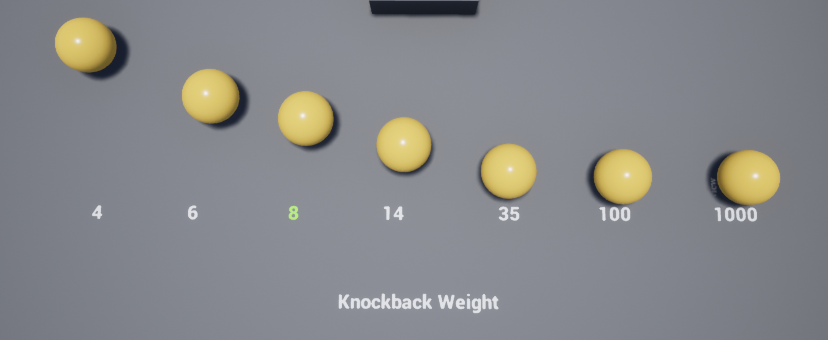
At this point, I created a line of enemies with different levels of Linear Damping, to determine how much an enemy would be knocked back by an attack. I decided that a value of 8 would work for now, and used that as default for my dummies.
I realised that I needed something else for my game. Having a simple attack and charge attack was not enough - instead, I needed a unique mechanic. After some thought experimenting, I decided that having both the player and enemy be able to use abilities would be interesting - however, the player would have to steal those abilities from the enemy in order to use them. This would be my main mechanic.
I decided to call this 'Soul Capture'. The idea is that the player would single out an enemy after defeating all of the others and attempt to 'capture' their soul to gain their ability. The mechanic sounded good! However, I needed abilities to capture in the first place. In order to re-use the same ability across enemy and player, I had to have the ability to be a separate blueprint. I then realised I could create my own blueprint components - this would be where I'd store my abilities.
So, I created a basic ability. An extremely long blink that would move the player in the direction they were moving.
What I effectively created was a short mini-game. Once the player presses the F key, if the enemy is in range, the player would freeze themselves and the enemy and initiate a minigame. The goal is to fight against a bar and raise it to 100 by spamming space - however, the bar would be decreasing over time depending on a value stored in the enemy being captured. This allowed me to make the minigame more difficult per enemy.

To help make this feel much more unique, I decided to try and implement a change in the camera. While using the SoulCap, the camera would come close and change to a normal field of view, giving a cinematic feel to it. To keep the player and enemy within frame, I attached a scene component and used it's rotation to affect the rotation of the camera. However, whenever I tried to use the SoulCap from an angle other than north, it would be incorrect. The camera wasn't rotating correctly.
Aaron attempted to figure out what the cause of this issue was, but neither of us could find the cause. With the use of Debug Spheres, I found that the world location of an object attached to the player wasn't affected by the rotation of the player. It was extremely frustrating, to the point that I dropped the idea of changing the camera to save time.
Once I had decided I was finished with Soul Cap (for now), I finally had a unique mechanic to revolve my game around. The player would attack a group of enemies, see their special abilities and decide on which one they feel would be most useful, defeat every enemy par from the one selected, capture the selected enemy and then have that ability until the next capture.I could even potentially do things like have certain abilities allow you to access new areas, much like a Metroidvania.
Wait...
Once I had a working basic attack and charge attack, I went on to create enemies to attack. I setup a simple dummy character that had a basic health system and then realised that upon attacking them, there was no feedback of any kind. The enemy just stood there and took it. This, obviously, didn't feel right.
One option for this would be to create an animated character and give them an animation in response to being attacked, but due to the time scale of this project, I knew that this would take far too long. Instead, I created a simple knockback system. The idea of this system is that when the enemy is attacked, it gets the direction of the attacker and pushes itself away from said attacker - effectively making the attacker look like they were knocked back.
This simple system proved to be very effective - having a response to the player's attack gave immediate feedback to the player. However, what needed to be decided is how far the enemy should be knocked back. I wanted bigger, heavier enemies to be knocked back less. This is where I implemented a way to 'scale' any form of physics movement from any source: Through the use of 'Linear Damping'.
However, using this method comes with it's own problems. For example, falling down will be extremely slow unless I returned Linear damping to normal (which I set to happen when 'IsFalling' is true). However, for my purposes, I felt that this would work.
Looking on at this near the end of the project, I would likely implement this in a different way. For example, scaling the launch of the knockback by a variable or using some other method to change the input force, not the output reaction.
At this point, I created a line of enemies with different levels of Linear Damping, to determine how much an enemy would be knocked back by an attack. I decided that a value of 8 would work for now, and used that as default for my dummies.
I realised that I needed something else for my game. Having a simple attack and charge attack was not enough - instead, I needed a unique mechanic. After some thought experimenting, I decided that having both the player and enemy be able to use abilities would be interesting - however, the player would have to steal those abilities from the enemy in order to use them. This would be my main mechanic.
I decided to call this 'Soul Capture'. The idea is that the player would single out an enemy after defeating all of the others and attempt to 'capture' their soul to gain their ability. The mechanic sounded good! However, I needed abilities to capture in the first place. In order to re-use the same ability across enemy and player, I had to have the ability to be a separate blueprint. I then realised I could create my own blueprint components - this would be where I'd store my abilities.
So, I created a basic ability. An extremely long blink that would move the player in the direction they were moving.
What I effectively created was a short mini-game. Once the player presses the F key, if the enemy is in range, the player would freeze themselves and the enemy and initiate a minigame. The goal is to fight against a bar and raise it to 100 by spamming space - however, the bar would be decreasing over time depending on a value stored in the enemy being captured. This allowed me to make the minigame more difficult per enemy.

To help make this feel much more unique, I decided to try and implement a change in the camera. While using the SoulCap, the camera would come close and change to a normal field of view, giving a cinematic feel to it. To keep the player and enemy within frame, I attached a scene component and used it's rotation to affect the rotation of the camera. However, whenever I tried to use the SoulCap from an angle other than north, it would be incorrect. The camera wasn't rotating correctly.
Aaron attempted to figure out what the cause of this issue was, but neither of us could find the cause. With the use of Debug Spheres, I found that the world location of an object attached to the player wasn't affected by the rotation of the player. It was extremely frustrating, to the point that I dropped the idea of changing the camera to save time.
Once I had decided I was finished with Soul Cap (for now), I finally had a unique mechanic to revolve my game around. The player would attack a group of enemies, see their special abilities and decide on which one they feel would be most useful, defeat every enemy par from the one selected, capture the selected enemy and then have that ability until the next capture.I could even potentially do things like have certain abilities allow you to access new areas, much like a Metroidvania.
Wait...

Comments
Post a Comment